
Every screen
and every setting.
Form Bridge adds one menu to the Perfex admin sidebar. This page walks through each screen in menu order and lists every setting with its default.
01Dashboard
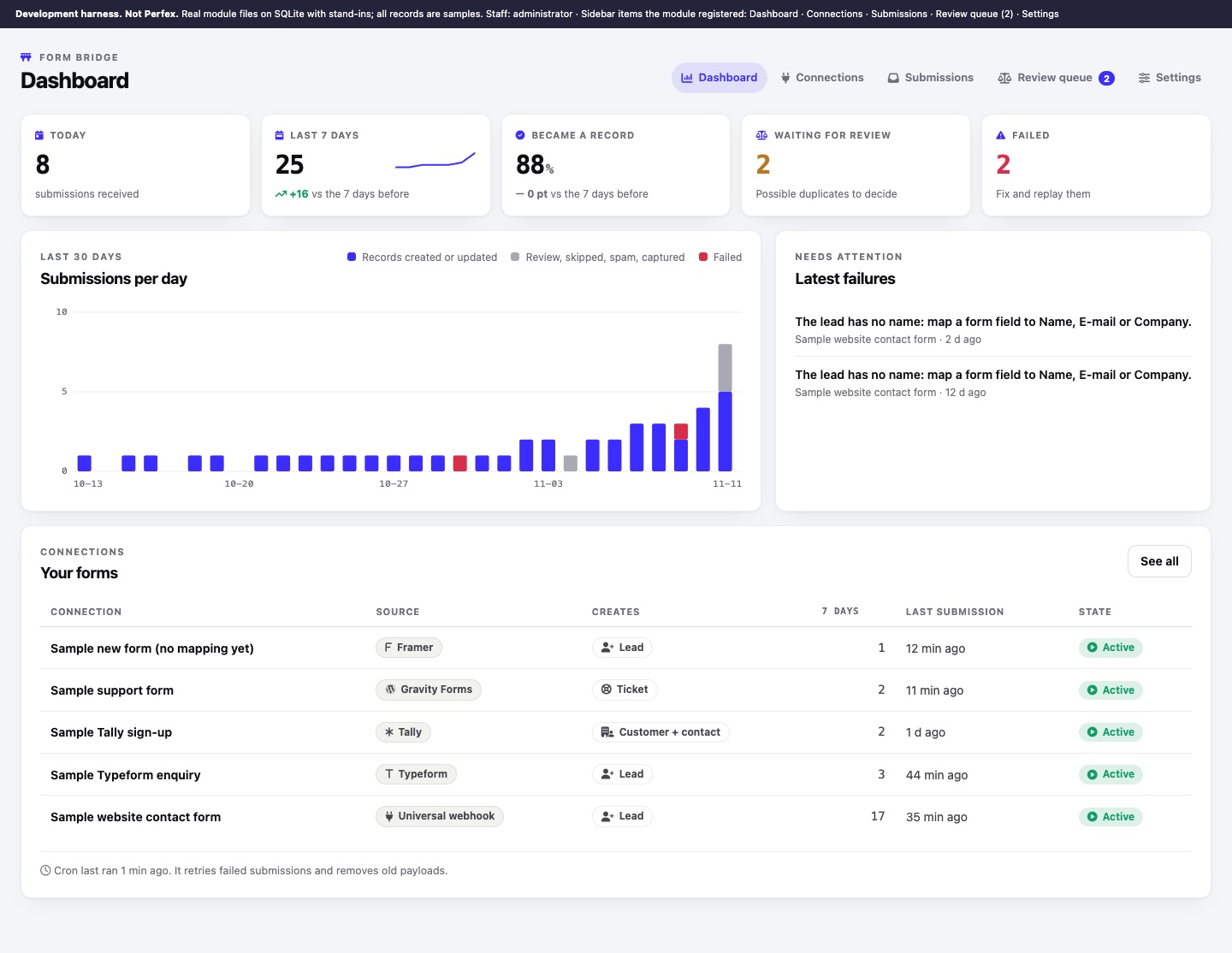
Key numbers (submissions today, last 7 days compared with the 7 days before, the share that became a record, items waiting for review, failures), a chart of submissions per day for the last 30 days, the latest failures with their reason, your connections with their 7-day count and last submission, and when the cron last ran.
02Connections
All connections with their form tool, target (Creates), 7-day count, failures, last submission and state, plus the New connection form (Name, Form tool, Creates). A connection without a mapping is marked "Waiting for a mapping: submissions are only captured". There is no limit on the number of connections.
03A connection, step by step
Each connection has five steps along the top and a Switch off / Switch on button. A switched-off connection answers HTTP 403 and stores nothing.
| Step | Contents |
|---|---|
| 1 Setup | Name, form tool, target. Defaults for new records: lead status, lead source, assign to, tags, ticket department, ticket priority, ticket subject when the form sends none. Behaviour: context note, notify the assigned staff member, also by e-mail, attach tickets to an existing contact (see Tickets), AI summaries (when AI is on), honeypot field, submission id field (tools without a signature), secret header name (tools that can send a header). On the right: the webhook link, Create a new link, Protection with the signing or shared secret, How to connect steps for the tool (with the Apps Script for Google Forms) and Delete this connection. |
| 2 Mapping | Field mapping and custom fields. |
| 3 Rules | Routing rules. |
| 4 Duplicates | Duplicates and the review queue. |
| 5 Test | Dry test with a pasted payload, a curl example for a real submission, and the latest submissions of this connection. |
04Submissions
The log with filters and search, and a page per submission with fields, result, raw payload, Save and replay, Delete and, with AI on, Ask AI for a summary. See Submission log and Replay.
05Review queue
Possible duplicates waiting for a decision: Merge into existing, Create new or Skip. See The review queue.
06AI queue
Shown only while the AI helper is on. Proposals waiting for approval, usage, recent decisions and the audit log. See Optional AI helper.
07Settings (administrators only)
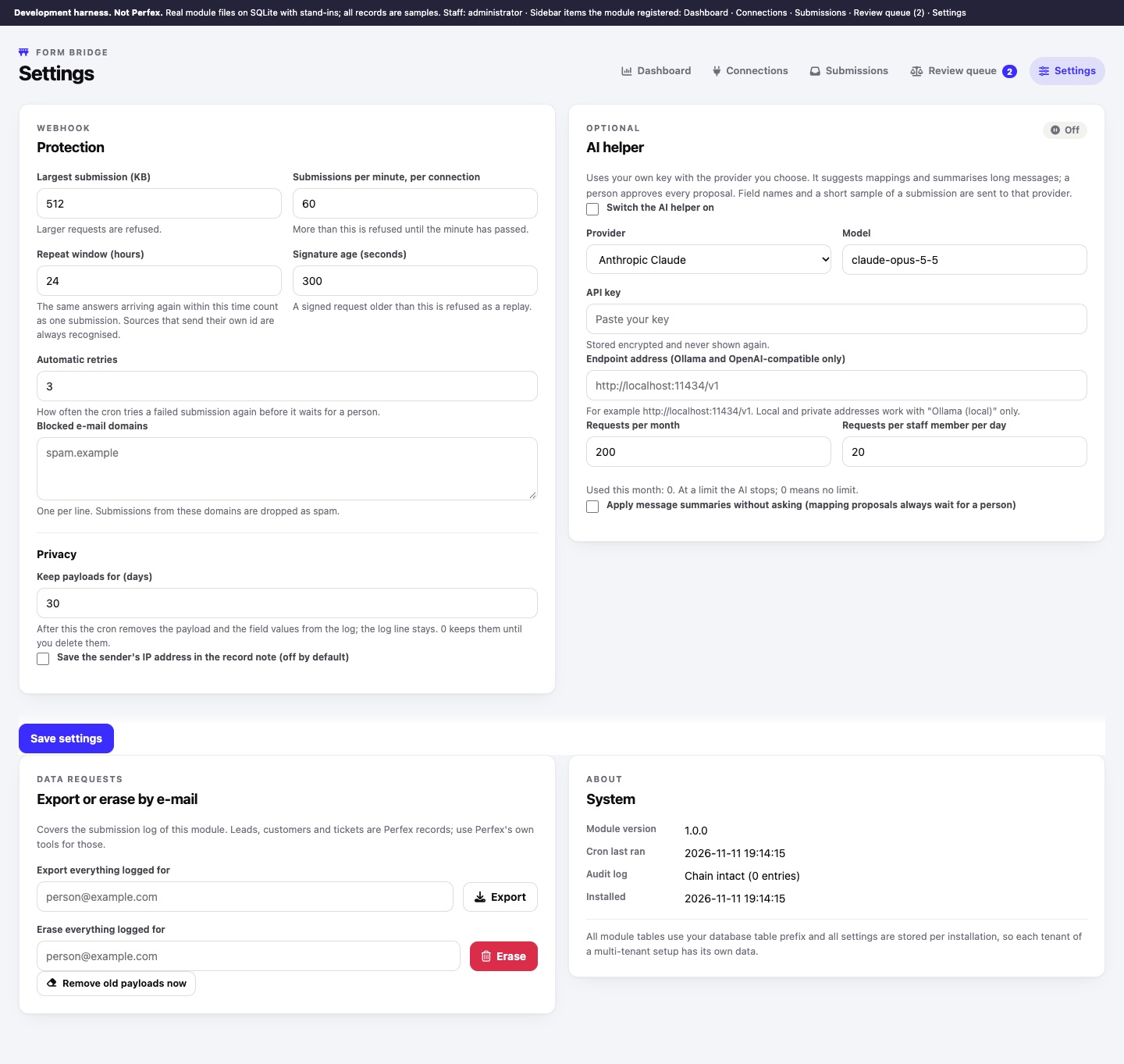
| Setting | Default | Allowed | What it does |
|---|---|---|---|
| Largest submission (KB) | 512 | 16 to 20480 | Larger requests are refused with HTTP 413. Your web server or PHP may have a lower limit of its own. |
| Submissions per minute, per connection | 60 | 1 to 100000 | More is refused with HTTP 429 until the minute has passed. |
| Repeat window (hours) | 24 | 1 to 8760 | The same body arriving again within this time counts as one submission. Tools that send their own id are always recognised. |
| Signature age (seconds) | 300 | 30 to 86400 | A signed Webflow or Google Forms request older than this is refused as a replay. |
| Automatic retries | 3 | 0 to 10 | How often the cron retries a failed submission before it waits for a person. |
| Blocked e-mail domains | empty | one per line | Submissions from these domains (and their subdomains) are logged as Spam. |
| Keep payloads for (days) | 30 | 0 to 3650 | See Retention. 0 keeps them. |
| Save the sender's IP address in the record note | off | Adds the IP to the context note. | |
| AI helper | off | Provider, model, API key, endpoint, limits (200 per month, 20 per staff member per day), apply summaries without asking (off). See Optional AI. |
Also on this page: Export or erase by e-mail, Remove old payloads now, and System (module version, when the cron last ran, audit log state, installation date).
08Changing texts and language
All texts are in modules/form_bridge/language/english/form_bridge_lang.php, and every key starts with fb_. To change a text without losing it on the next update, override the key in Perfex's custom_lang.php for your language, as Perfex describes for its own texts. Version 1.0.0 ships English only.