
Optional AI helper
your own key, a person approves.
Form Bridge works fully without AI, and the AI helper is off after installation. If an administrator switches it on with your own API key, it can suggest a field mapping and summarise long messages. Proposals wait in the AI queue until a person approves them.
01What it does
| Action | Where you start it | What is sent to the provider | What approval does |
|---|---|---|---|
| Mapping suggestion | Connection › Mapping › Ask AI to suggest | The form's field names, question texts and a sample value (up to 40 characters each) and the list of Perfex fields | Replaces the connection's mapping with the proposed rows. You can change it afterwards. |
| Message summary | Submission page › Ask AI for a summary, or automatically by the cron for connections with Ask the AI to summarise long messages on | Answers of 80 characters or more (up to 4000 characters each), with their question texts | Adds "AI summary: …" as a note on the record and, for a lead, up to three suggested tags. You can edit the summary before approving. |
A summary is only possible for a submission that created or updated a record. The automatic summaries cover submissions from the last two days, at most five per cron run. Text from a form is treated as data, never as instructions; the model's answer is cleaned like any other text before it reaches Perfex.
02Switch it on
- Open Form Bridge › Settings(administrators only), card AI helper.
- Tick "Switch the AI helper on"
- ProviderAnthropic Claude, OpenAI, Google Gemini, OpenRouter, Ollama (local) or OpenAI-compatible endpoint.
- ModelType the model name exactly as your provider lists it. The field starts with an Anthropic model name; change it when you pick another provider.
- API keyPaste the key from your provider account (not needed for Ollama). It is stored encrypted and afterwards shown only masked. Remove the saved key deletes it.
- Endpoint addressOnly for Ollama and OpenAI-compatible endpoints, for example
http://localhost:11434/v1. Local and private addresses work with "Ollama (local)" only. A key saved for a named provider is only ever sent to that provider's own address. - LimitsRequests per month (default 200) and requests per staff member per day (default 20). At a limit the AI stops until the next month or day;
0means no limit. - Click Save settingsthen Test the AI connection. The message shows the model's short answer, or the provider's error in plain words.
The AI queue menu item and the per-connection option Ask the AI to summarise long messages appear only while the AI helper is on.
03The AI queue
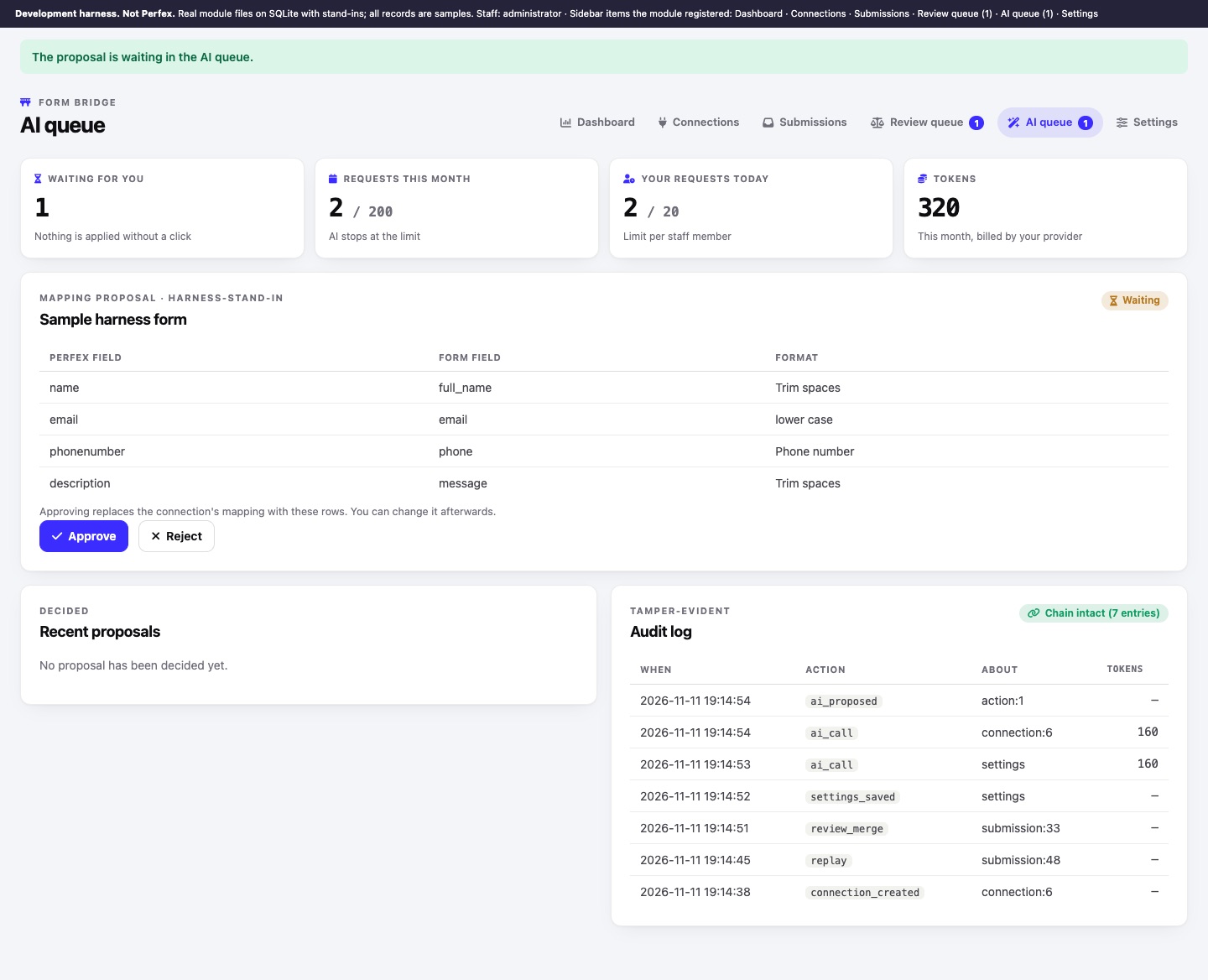
Form Bridge › AI queue shows the proposals waiting for you, the usage (requests this month against the monthly limit, your requests today, tokens this month), recently decided proposals and the audit log.
- Read the proposalA mapping proposal lists Perfex field, form field and format. A summary shows the text, which you can edit.
- Approve or RejectNothing is applied without a click. Each proposal can be decided once.
Apply message summaries without asking (Settings, off by default) lets summaries be applied straight away. Mapping proposals always wait for a person.
04Audit log
Every AI call (with its token counts), every AI proposal and decision, and the sensitive admin actions (new connection, secrets saved or removed, new link, replay, review decisions, settings saved, deletions, purge, export, erase) are written to an append-only audit log. Each entry stores the fingerprint of the one before it, so an entry edited or deleted directly in the database breaks the chain; the AI queue and Settings › System show "Chain intact" or the entry where it breaks.
05Steward AI (separate module)
If you also run the separate MIKODES module Steward AI, Form Bridge registers two read-only tools for it: recent form submissions with their status, and per-connection statistics. Field values are not returned. Without Steward AI nothing changes.